Stole Design Tool Guide
The perfect custom graduation stole is just a few clicks away!
Get to know all the customizations tools available to help you create a design that showcases your journey. Your graduation.

Base Tool
Allows you to select the stole base you would like to create your design on. Choose from satin, cultural stole patters, or our available flag stoles.
Help Tip # 1 – Choose satin for maximum customization (colors, hybrid tips). Cultural and flag bases have fixed patterns but still allow text and logos.

Color Tool
Changes the body and trim color of a satin stole. You can change the main body color of the stole and the color of the trim, a thin piece of satin that goes around the majority of our stole types. Some stoles do not have a trim such as our full cultural stoles. Trim color on flag stoles cannot be changed.
This tool does not allow for color changes on cultural patterns or flag stoles.
Help Tip # 1 – Use trim to add contrast or tie in accent colors from logos or flags.
Help Tip # 2 – Match your school, organization, or regalia colors. Dark colors work best with light text for readability.

Text Tool
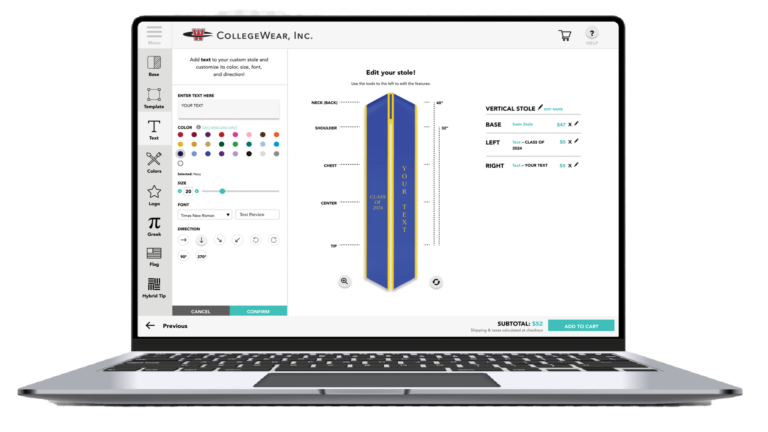
Adds custom text to your stole with drag and drop placement. The text tool lets you move text anywhere on the stole, change the direction, layout, size and color. You can even add text to the neck of your stole.
IMPORTANT: Need to include special characters? Please contact us before ordering for further assistance. Emojis cannot be included as text embroidery. Please search our logos database to add symbols.
Help Tip # 1 – Common uses include graduation year, major, organization name, or a short message. Stick to 1–2 fonts to keep the design clean.
Help Tip # 2 – Vertical layouts are most popular for names and years. Preview often to ensure text isn’t too close to the edges.
Help Tip # 3 – Bigger isn’t always better—make sure text looks balanced on both sides of the stole. High-contrast colors read best from a distance.
Help Tip # 4 – Align text visually rather than mathematically—trust how it looks, not just the numbers.

Logo Tool
Adds a logo to your stole. Select from our database or upload your own. All logos are embroidered onto your stole. If your logo file has a background
Help Tip # 1 – Upload high-quality files (PNG or JPG).
Help Tip # 2 – Simple logos stitch best—avoid fine lines and busy backgrounds.
Help Tip # 3 – If your logo doesn’t have a transparent background, add it anyway and click the Logo Background Removal checkbox before clicking confirm to add your logo

Greek Tool
Adds Greek letters, crests, or seals to your stole.
IMPORTANT: The addition of certain greek letters and/or logos may require additional review which may add to lead time, if required a team member will reach out or you may contact us
Certain greek organization elements require a fee for usage. Applicable fees are calculated as part of your order total and will be shown on the order summary page.
Help Tip # 1 – Double-check spelling and order before checkout—Greek text is customized exactly as entered.
Help Tip # 2 – If your crest isn’t listed, submit a request or upload it as a logo instead.

Flag Tool
Adds national, state, or pride flags to your stole design.
Help Tip # 1 – Flags are great for heritage or identity representation. If you don’t see yours, use the logo upload option.

Hybrid Tip Tool
Adds patterned tips to the ends of a satin stole only.
Help Tip # 1 – Hybrid tips are ideal for cultural expression or extra flair—use them to complement your stole design.
Custom Graduation Stoles Made Easy!
Watch our graduation stole tutorial video on how to use our stole design app!
See how easy it is to make the stole of your dreams in just a few simple clicks!
Support
Need some help?
View Your Account
Log into your account here to view your order status, check your dashboard, and more.
Submit Support Ticket
Need help? Submit a support ticket to contact our team for assistance.
Help Desk
Get further support here with our FAQ and customer feedback survey.